
 Are you ready to stop chasing slow-paying real estate photography customers? Would you like to spend that time going after new customers or anything else? Now you can!
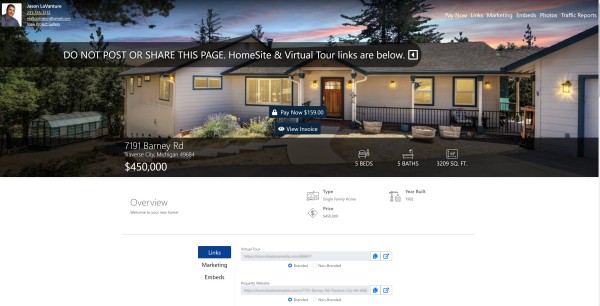
RTV’s new Delivery Site is ready for “Pay to Download”. We’re live with multiple payment gateways, and there are still three more on the way including Quickbooks. Finally, we’ve pre-loaded the RTV Package and Add-On system with dozens of default icons for your shopping center. It’s time to learn how to set this up for success!
On Tuesday, August 24th, let’s connect for a one-hour training session on the above and some of RTV’s other new features, such as our aspect ratio settings. Please carve out a little time for this show as we’ll be covering how to set up payment gateways, create packages, add-ons, and of course, set up your business to collect payment before your customers can download their photos.
REGISTER HERE – https://www.realtourvision.com/webinar-information.html
During the show, I’ll be joined by RTV’s Programming Architect, Marco Cabrera, who is helping to design and program these new features with the other members of our development team.
Check out this EXAMPLE Delivery Site that’s awaiting payment from a customer – NEW DELIVERY SITE
Here’s a video that was made to help BlueLaVaMedia customers use our Delivery Site – https://youtu.be/zo_QgARYR3Q
With the help of Marco we’ll also be providing an update on the second half of the payment collection process. This second piece introduces you to your customizable and embeddable form, which will become your online storefront. Your storefront is where your customers store credits cards, place photography and virtual tour orders, and more.
We hope to see you there! Don’t forget to register now.
Sincerely,
Jason & Team RTV
RTV, Inc
Virtual Tour Software & National Photography Service


